Skip to Main Content
Sam's Club
Sam's Club
Customer reviews for SAMSUNG Q-series 5.1 Channel Sound Bar with Wireless Subwoofer, Q-Symphony & Dolby ATMOS Audio for
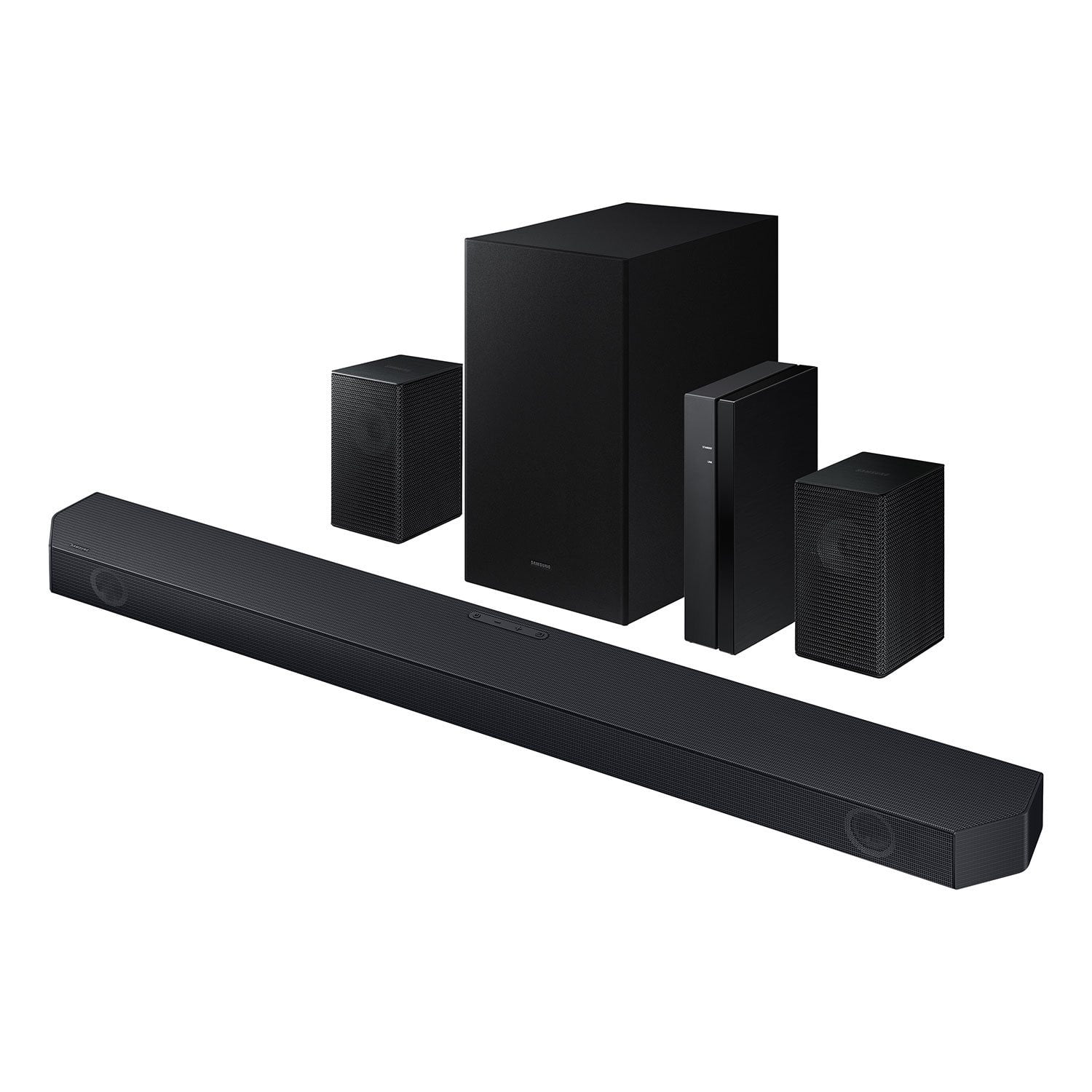
SAMSUNG Q-series 5.1 Channel Sound Bar with Wireless Subwoofer, Q-Symphony & Dolby ATMOS Audio
4.5 out of 5 stars
stars
500 ratings381 reviews
  1. 5 stars75% (374)
  2. 4 stars15% (73)
  3. 3 stars5% (24)
  4. 2 stars1% (6)
  5. 1 star5% (23)

Member photos

  • +49 images
Sort by |
Showing 101-110 of 381 reviews
Jul 13, 2026
Reviewer name: Sounds bar
1 out of 5 stars
1 out of 5 stars review

Won't last

[This review was collected as part of a promotion.] My sound bar and sub package only lasted one year and stopped working.

Review from Samsung US
Helpful?3195MT0SA8FL13599821582
reply from Samsung Solutions

Hi Sounds bar, We appreciate your feedback regarding the issues you are experiencing with your HW-Q65C Soundbar. First, try doing a soft reset, unplug the soundbar from the outlet for roughly 30 seconds and then plug it back in. If this still does not correct your issue, then do a hard reset. With the Soundbar on, press the + & - Volume buttons on the body of the soundbar at the same time for at least 5 seconds. INIT OK” appears on the display and then the Soundbar is reset. While the Soundbar is On, press both the Vol+ and Vol- buttons on the unit simultaneously until the display shows "INIT", then release. If this doesn’t work, then try using the remote control: While the Soundbar is ON, press and hold the SOUND CONTROL ("Gear") button on the Soundbar remote for 10 seconds. You will see "150HZ" on the display. Keep pressing until you see "INIT" on the display, then release. Samsung is committed to providing the best possible product experience, quality, and value. We back this Samsung Soundbar with a 1-year limited manufacturer's warranty, including authorized repair for manufacturer defect, if purchased brand-new directly from an authorized seller. If you need more help, Samsung is here for you. Please call us at 1-800-SAMSUNG, Mon – Fri 8 AM – 9 PM EST, Sat & Sun 8 AM – 6 PM EST. Live Chat with an agent as well as manuals, software, creating a service ticket, and warranty info can be found at the ‘Support’ link on our Samsung website. ~ Samsung Solutions

Mar 21, 2026
Reviewer name: Lindy
5 out of 5 stars
5 out of 5 stars review

Q symphony Soundbar

[This review was collected as part of a promotion.] I love this product! The sound clarity, direction, immersive, synchronization and soundstage is worth every dime.

Review from Samsung US
Helpful?3195MT0SA8FL13599821582
Mar 31, 2026
Reviewer name: Hoppy
3 out of 5 stars
3 out of 5 stars review

Not as I thought

[This review was collected as part of a promotion.] Setting this up is not near as hard as to pair...I finally got it to pair but now I have issues increasing volume on rear blutooth speakers included.

Review from Samsung US
Helpful?3195MT0SA8FL13599821582
reply from Samsung Solutions

Hello Hoppy, We appreciate you taking a few moments to review the Samsung HW-Q65C Soundbar. With the wireless Rear Speaker Kit connected you can adjust the volume by using the provided Soundbar remote. Press CH LEVEL and select REAR LEVEL, then use the Up/Down buttons to adjust the volume within a -6 to +6 range. If you need more help, Samsung is here for you. Please call us at 1-800-SAMSUNG, Mon – Fri 8 AM – 9 PM EST, Sat & Sun 8 AM – 6 PM EST. Live Chat with an agent as well as manuals, software, creating a service ticket, and warranty info can be found at the ‘Support’ link on our Samsung website. ~ Samsung Solutions

Mar 21, 2026
Reviewer name: KIM
5 out of 5 stars
5 out of 5 stars review

Feels like I'm in a movie theater!

I love the surround sound and deep bass! I had my daughter's boyfriend set it up for me since the instructions were a bit confusing for me. It works very well with my TV, which isn't a Samsung. For the money, this system is well worth it!

Helpful?3195MT0SA8FL13599821582
Apr 5, 2026
Reviewer name: Sammy
4 out of 5 stars
4 out of 5 stars review

Audio Review

[This review was collected as part of a promotion.] Sound is fine but I wish you could get voice out of all speakers vs just the center. Make it an option to allow voice audio out of Left-Center-Right

Review from Samsung US
Helpful?3195MT0SA8FL13599821582
Mar 4, 2026
Reviewer name: Sweeper5150
3 out of 5 stars
3 out of 5 stars review

Great product bad instructions

[This review was collected as part of a promotion.] Great product but lousy instructions. A few clear pictures would really help. The video is not that useful

Review from Samsung US
Helpful?3195MT0SA8FL13599821582
reply from Samsung Solutions

Hi Sweeper5150, We appreciate you taking a few moments to review the HW-Q65C Samsung Soundbar. You can find the full manual for this soundbar by visiting the following link: https://downloadcenter.samsung.com/content/UM/202507/20250723034231001/HW-Q65C_ZA_WUG_03_ENG_250218.0.pdf If we can help with anything else, please call us at 1-800-SAMSUNG (Ask for Soundbars), 8 AM – 12 AM EST, 7 days a week. Live Chat with an agent as well as manuals, software, creating a service ticket, and warranty info can be found at the ‘Support’ link on our Samsung website. ~ Samsung Solutions

Apr 13, 2026
Reviewer name: SHK01
2 out of 5 stars
2 out of 5 stars review

Low sound

[This review was collected as part of a promotion.] I find this sound very low when connect to my Samsung QLED tv. Volume general needs to be at around 60

Review from Samsung US
Helpful?3195MT0SA8FL13599821582
reply from Samsung Solutions

Hello SHK01, Thank you for taking a few moments to review the HW-Q65C Samsung Soundbar. You can manually optimize your audio experience by pressing the SOUND MODE button to select the desired pre-equalized sound setting. The choices are SURROUND SOUND – GAME – ADAPTIVE SOUND – DTS VIRTUAL:X – STANDARD. To control the volume of the treble or bass press the TONE CONTROL button, and then adjust the volume between -6 to +6 by using the Up/Down buttons on your soundbar remote. Press and hold the SOUND CONTROL button for about 5 seconds to adjust the sound for each frequency band. 150Hz, 300Hz, 600Hz, 1.2kHz, 2.5kHz, 5kHz, and 10kHz are selectable using the Left/Right buttons and each can be adjusted to a setting between -6 to +6 using the Up/Down buttons. (Make sure the Sound mode is set to “STANDARD”.) Press the CH LEVEL button so you can adjust the volume of each speaker. CENTER LEVEL can be adjusted using the UP/DOWN buttons from -6 to +6. With the Wireless Rear Speaker Kit connected you can adjust the volume by using the provided Soundbar remote. Press CH LEVEL and select REAR LEVEL, then use the Up/Down buttons to adjust the volume within a -6 to +6 range. If you would like louder (or softer) bass from your subwoofer, you can adjust the level by rocking the WOOFER button on the soundbar remote, and then adjusting the level from -6 to +6. To set the subwoofer volume level to 0, press the button in. If you need more help, Samsung is here for you. Please call us at 1-800-SAMSUNG, Mon – Fri 8 AM – 9 PM EST, Sat & Sun 8 AM – 6 PM EST. Live Chat with an agent as well as manuals, software, creating a service ticket, and warranty info can be found at the ‘Support’ link on our Samsung website. ~ Samsung Solutions

Apr 2, 2026
Reviewer name: Mike
1 out of 5 stars
1 out of 5 stars review

Garbage! Don’t waste your $$

Rear speakers don’t connect and are not supported by the remote. Looks like Samsung threw them in the box without confirming they pair properly. Samsung Customer service is awful!!! Useless

Helpful?3195MT0SA8FL13599821582
reply from Samsung

Hello Mike,<br /><br />We appreciate you taking a few moments to review the Samsung HW-Q65C Soundbar.<br /><br />To setup the wireless rear speaker kit included with the soundbar, first use the color-coded speaker wires to connect the rear speakers to its wireless module and place these three in the back of your room. Plug the wireless receiver module power cord into an electrical outlet and into the wireless receiver module to turn on the wireless receiver module. <br /><br />Press and hold the ID SET button on the back of the wireless module for at least 5 seconds or until the blue light starts blinking. Turn off your soundbar and press the Up button on the remote for 5 seconds. The ID SET message will appear on the soundbar for a short time and then disappear. After the ID SET process, the soundbar power is automatically turned on. The LINK LED indicator stops blinking and glows a solid blue when a connection is established between the soundbar and the wireless receiver module.<br /><br />If you need more help, Samsung is here for you. Please call us at 1-800-SAMSUNG, Mon – Fri 8 AM – 9 PM EST, Sat &amp; Sun 8 AM – 6 PM EST. Live Chat with an agent as well as manuals, software, creating a service ticket, and warranty info can be found at the ‘Support’ link on our Samsung website.<br /><br />~ Samsung Solutions

Mar 6, 2026
Reviewer name: bak1992
3 out of 5 stars
3 out of 5 stars review

Great sound

[This review was collected as part of a promotion.] the sound is terrific. Still having a problem hooking up the wireless speakers. No sound comes out

Review from Samsung US
Helpful?3195MT0SA8FL13599821582
reply from Samsung Solutions

Hi bak1992, Thank you for taking a moment to review the Samsung HW-Q65C Soundbar. To setup the wireless rear speaker kit included with the soundbar, first use the color-coded speaker wires to connect the rear speakers to its wireless module and place these three in the back of your room. Plug the wireless receiver module power cord into an electrical outlet and into the wireless receiver module to turn on the wireless receiver module. Press and hold the ID SET button on the back of the wireless module for at least 5 seconds or until the blue light starts blinking. Turn off your soundbar and press the Up button on the remote for 5 seconds. The ID SET message will appear on the soundbar for a short time and then disappear. After the ID SET process, the soundbar power is automatically turned on. The LINK LED indicator stops blinking and glows a solid blue when a connection is established between the soundbar and the wireless receiver module. If you need more help, Samsung is here for you. Please call us at 1-800-SAMSUNG, 8AM - 12AM EST (Ask for Soundbars), 7 days a week. Live Chat with an agent as well as manuals, software, creating a service ticket, and warranty info can be found at the ‘Support’ link on our Samsung website. ~ Samsung Solutions

Feb 8, 2026
Reviewer name: MICHELLE
4 out of 5 stars
4 out of 5 stars review

Note for 2025 Samsung Tv Owners

Yes, it will work, as you need to plug in it in via HDMI or optical, and if your TV is a 2025 Samsung model, you'll get the added benefit of Q-Symphony integration for enhanced audio.

Helpful?3195MT0SA8FL13599821582